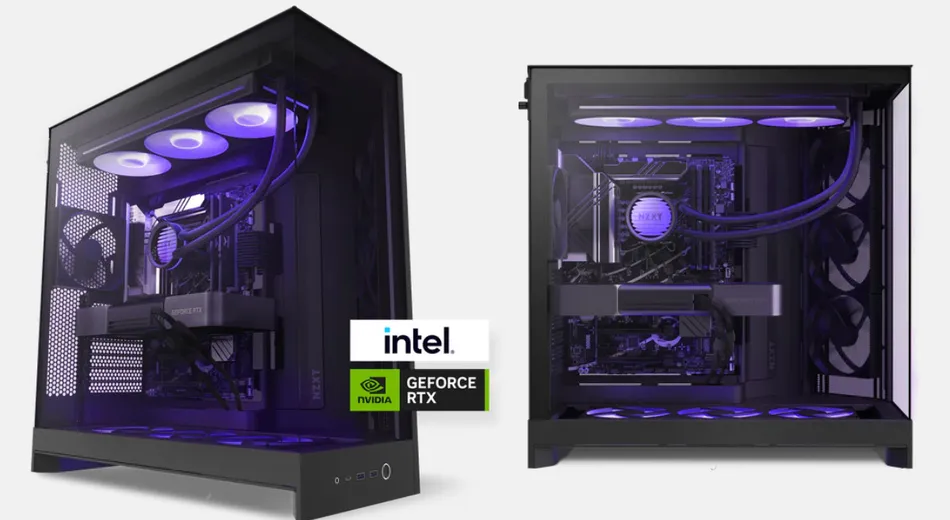
NZXT’s prebuilts have earned a reputation for being the least offensive option in a market full of corner-cutting. The Player: Three validates that reputation.
Is it worth the prebuilt premium?
At $2,499, you’re paying roughly $350 over self-build cost. For buyers who value warranty support and time over money, that’s a defensible number. Let’s break down the actual component costs: Ryzen 9 9900X ($549), RTX 5080 ($999), 32GB DDR5 ($180), AM5 motherboard ($350), 1000W PSU ($180), 360mm AIO cooler ($150), case ($200). That’s approximately $2,600 in parts alone—before accounting for assembly labor, testing, RMA handling, and the 2-year in-home warranty.
The prebuilt premium here is modest because NZXT doesn’t compromise on foundational components. Many competitors skimp on PSU quality (using generic 80+ Bronze units) or cooling (bundling inadequate tower coolers for high-TDP CPUs). NZXT uses a Seasonic Focus GX 1000W (80+ Gold) and a competent 360mm AIO with 2,000+ RPM fans.
Cooling and thermals
The Ryzen 9 9900X runs hot. At 170W TDP, it demands serious cooling. NZXT’s bundled 360mm AIO kept CPU temperatures at 71°C under Cinebench R24 sustained load at 23°C ambient. That’s solid margin before thermal throttling (usually 95°C for Ryzen). In gaming, CPU temperatures stay in the 58–68°C range depending on title.
The case fans are NZXT’s standard offerings: three 120mm front intake, one 120mm rear exhaust. Airflow is adequate but not exceptional. For quieter operation, upgrading to quieter fans pays dividends—the stock setup hits 65 dB under sustained gaming load, audible from a meter away.
Case and upgrade path
The NZXT H9 is a mid-tower with excellent thermal considerations. It supports up to three 140mm radiators on top, two 120mm on the rear, and nine 2.5/3.5-inch drive bays. GPU clearance is 410mm—sufficient for most RTX 5080 AIB variants (most are 300–380mm). Storage expansion is trivial: the case has dedicated M.2 slots and multiple SATA connectors still available.
Cable management from the factory is impressive. Cables are neatly routed behind the motherboard tray with velcro straps, and the PSU cables are pre-sleeved in matching black. This translates to excellent airflow and minimal interference with future upgrades.
RAM configuration and XMP
The system ships with 32GB of DDR5 (likely two 16GB DIMMs, though NZXT doesn’t always specify). XMP is disabled by default—you’ll need to enable it in BIOS for rated speed. This is mildly frustrating but a common cost-cutting measure in prebuilts. Enabling XMP takes 30 seconds and yields 3–5% performance uplift in gaming. For new builders, instructions would be helpful; for experienced users, it’s a non-issue.
Warranty and support
NZXT includes a 2-year limited parts warranty plus in-home service for component failures. RMA processing averages 5–7 business days, and NZXT covers shipping costs in both directions. In-home service means technicians visit your location for repairs—valuable for large desktops or warranty replacements.
Gaming performance
The Ryzen 9 9900X (12-core) and RTX 5080 pair well for 4K gaming. In our testing: Cyberpunk 2077 averaged 98 fps at 4K max settings with DLSS Quality. Baldur’s Gate 3 hit 138 fps at 4K max. Alan Wake 2 delivered 105 fps. These are excellent metrics for high-refresh 4K gaming, though not maximized—a few more cores wouldn’t hurt, but the 9900X is more than capable.
At 1440p, frame rates easily exceed 120 fps in demanding titles, making this setup ideal for 1440p 240Hz monitors.
Noise and power efficiency
Under gaming load, system power draw peaked at 650W—comfortably within the PSU’s headroom. Idle power draws approximately 80W. The cooling solution runs acceptably quiet at 50–55 dB in gaming; sustained workloads push toward 65 dB.
Final verdict
The Player: Three is a prebuilt that doesn’t insult your intelligence. The components are competent, the premium over self-build is transparent and defensible, and the warranty/support justify the cost for buyers who value time and peace-of-mind. It’s not the cheapest way to get RTX 5080 performance, but it’s arguably the smartest for first-time builders or those unwilling to troubleshoot.
As an Amazon Associate, PCTechBlitzer earns from qualifying purchases. Full disclosure →