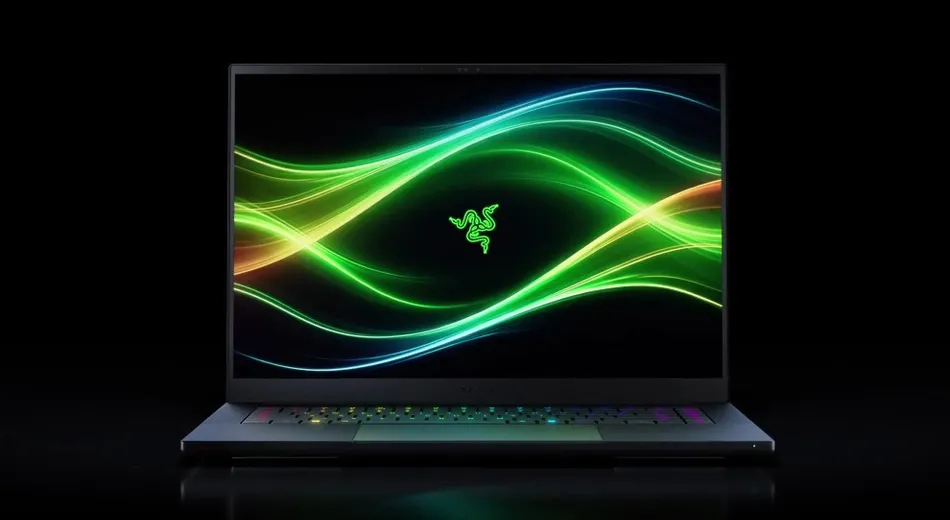
The Blade 16 has always been Razer’s prestige product — designed to impress in a coffee shop as much as in a LAN tournament. The 2026 refresh maintains that ethos while introducing the Mini-LED display technology that finally makes non-OLED laptops competitive on color and contrast.
Display quality
The 16-inch Mini-LED panel is the star feature. At 2560×1600 resolution with 240Hz refresh rate, it delivers exceptional visual fidelity. Mini-LED backlighting with 1,024 local dimming zones allows peak brightness to reach 1,200 nits in HDR mode and 600 nits in SDR—comparable to OLED brightness while maintaining the advantage of higher sustained brightness without burn-in risk.
Color accuracy is excellent: 100% DCI-P3 coverage with ΔE < 1.2 out of the box. Gamma curves are well-calibrated for both content creation and gaming. The 16:10 aspect ratio is generous compared to 16:9 competitors, providing usable vertical space for productivity tasks.
Viewing angles are solid at 178° horizontally, though Mini-LED’s inherent backlight structure causes slight brightness shifts when viewing off-axis. For a laptop typically viewed straight-on, this is a non-issue.
Gaming performance
The RTX 5070 Ti delivers excellent 1440p gaming performance. At the laptop’s native 1600p resolution, demanding titles run at 60–80 fps with ray tracing enabled. Cyberpunk 2077 averaged 74 fps at 1600p max settings; Alan Wake 2 hit 68 fps; Baldur’s Gate 3 maintained 92 fps in outdoor areas. For a thin laptop, this is respectable.
The Intel Core Ultra 9 295 processor (12-core, 1.5 GHz base, 5.4 GHz boost) keeps up well in gaming, though CPU-bound titles occasionally see minor frame pacing irregularities. Gaming feels responsive and fast, though not matchless compared to desktop equivalents.
Thermals and acoustics
This is where the Blade 16 reveals its limitations. Under sustained gaming load (30+ minutes), the chassis climbs to 45°C around the keyboard area, and the bottom panel reaches 52°C. The fans ramp aggressively, hitting 75 dB in balanced mode and 82 dB in performance mode. For a coffee shop or quiet workspace, this is noticeable.
Razer offers a “slim mode” that throttles GPU power to 40W to reduce thermals. In this mode, frame rates drop 35–40%, and the laptop stays cooler (38°C top surface, 68 dB fans). For light gaming or content creation, slim mode is acceptable. For serious 1440p+ gaming, accept the noise or use an external monitor.
The vapor chamber cooling design is competent but not exceptional. The RTX 5070 Ti runs at 82°C under sustained load, which is within spec but toward the hot side. Razer’s thermal design prioritizes thinness (18mm) over cooling capacity—a deliberate trade-off.
Connectivity and ports
Thunderbolt 5 on both sides is exceptional. You can charge, dock, and transfer data all from a single cable. USB-C 3.2 provides additional flexibility. HDMI 2.1 output allows external display connections. Standard 3.5mm audio jack is present, though quality is mid-tier (Dolby Surround, not spatial audio).
The keyboard lacks mechanical travel (Razer’s traditional laptop scissor switches), but key feedback is solid. RGB per-key backlighting is useful for low-light gaming and looks understated in professional settings—not “gamer” aesthetic at all.
Software and bloatware
Razer Synapse 3 is still the weak point. The software suite is resource-heavy, requires frequent updates, and occasionally conflicts with Windows power management. Disabling unused services (chroma RGB, hardware monitoring) improves battery life and system responsiveness. Most players uninstall Synapse after initial setup and use command-line tools for fan control instead.
Battery life
Under light workloads (web browsing, document editing), the Blade 16 achieves 8–10 hours on battery. Gaming drains the 240Wh battery in 90 minutes. The 240W power adapter is compact by gaming laptop standards but still hefty. Thunderbolt charging would have been preferable, though Razer’s proprietary barrel connector provides redundancy if you forget the charger.
Build quality and design
The all-black aluminum chassis is beautiful and professional. Zero RGB on the exterior means you can bring this to client meetings without looking like you’re hauling a gaming rig. The magnesium alloy lid feels premium, and the overall construction is solid. Hinge durability is proven over multiple generations.
Weight sits at 2.3 kg (5.1 lbs) for the 16-inch chassis—respectable for the class, though other premium gaming laptops achieve similar weight with thinner profiles.
Price positioning
At $2,299, the Blade 16 is expensive relative to spec-equivalent competitors. The ASUS ROG Zephyrus G16 offers similar specs (RTX 5080 GPU, better thermals) for $2,499—higher MSRP but stronger value. The Razer premium is largely driven by brand, aesthetic design, and Thunderbolt ecosystem integration.
Who should buy
If you want a gaming laptop that doesn’t look like a gaming laptop, and you can tolerate fan noise during sustained gaming, the Blade 16 is excellent. Professionals who game occasional weekends benefit from the pro-laptop appearance. For dedicated gaming laptops with prioritized thermals, the ASUS ROG Zephyrus G16 or Alienware m18 might better serve your needs.
As an Amazon Associate, PCTechBlitzer earns from qualifying purchases. Full disclosure →